This article reflects the information announced on April 27, 2020.
April 27, 2020
The batteries can be replaced in all models of our thermometers.
Please refer to the model numbers and replacement methods below.
| Product | Model number | Battery type | Replacement method |
|---|---|---|---|
| Ear/forehead thermometer | CTD711 | CR2032 | Sliding cover |
| Ear thermometer | CTD505 | CR2032 | Sliding cover |
| Thermometer with vibration alert | CTEB720VA, CTEB718V | CR2025 | Cover opened and closed with a coin or similar object |
| Predictive thermometer | CTE709, CTE707, CTE509, CTE507, CTEB503L, CTEB502, CTE501 | LR41 (192) | Cover opened and closed with a coin or similar object |
| Predictive thermometer | CT791SP | CR2025 | Cover opened and closed with a coin or similar object |
| Direct-measurement thermometer | CTA319, CT422, CT412 | LR41 (192) | Hook fastener |
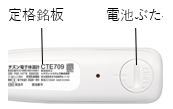
The thermometer model number is shown on the rating plate on the back of the thermometer.
For other discontinued products, the button battery type is indicated on the battery cover or rating plate.
Please check these markings.
Battery replacement precautions

When replacing batteries, take care to prevent small children from swallowing button batteries.
Take care not to touch batteries that are leaking.
Battery replacement steps
Sliding cover
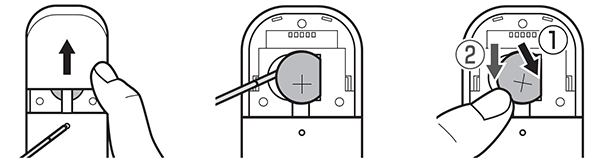
- Slide the battery cover open.
- Remove the old battery.
- Insert a new battery, making sure it is oriented correctly.
- Close the battery cover.
Cover opened and closed with a coin or similar object
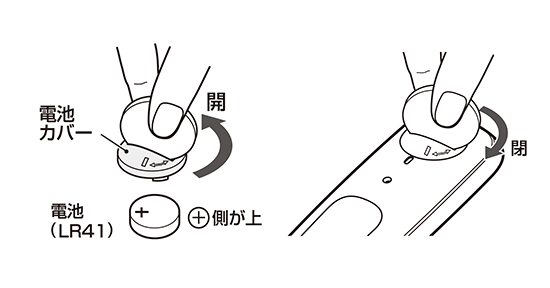
- Insert a coin or similar object into the groove in the battery cover and turn it counterclockwise.
The battery cover will rise; remove it by hand. - Remove the old battery.
- Insert a new battery, making sure it is oriented correctly.
- Press down on the battery cover while turning it clockwise with a coin or similar object.
Hook fastener
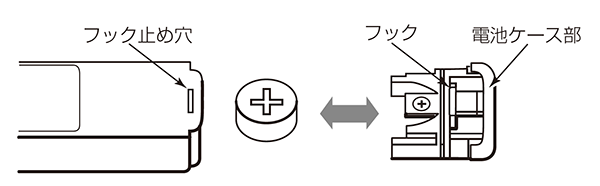
- Insert a small flathead screwdriver or similar tool into the hook-fastener hole on the back of the thermometer.
Press inward while pulling out the battery case. - Remove the old battery.
(Do not use metal objects such as tweezers, as they may damage the battery.) - Insert a new battery, making sure it is oriented correctly.
- Push the battery case back in, making sure it is the right way up.
Related information
Current product support and inquiries
Text within the original images remains in Japanese.